Use a PIN
In the previous tutorial we have learnt how to join an unprotected conference, but in day to day usage, we will encounter some conferences that are protected by a PIN (a security passcode). In this lesson we will learn how join protected conferences by following the next steps:
- Identify when a conference is protected by a PIN.
- Enter the conference with the PIN provided by the user.
You can download the starter code from Step.02-Exercise-Use-a-pin.
App component
To implement this feature, we only have to modify the file src/App.tsx, since
the rest of the pieces are already on place.
The first step is to import a component that will display a form to enter the PIN:
import {Pin} from './components/Pin/Pin';
Next, we will define two new states that indicate if the user can or have to
enter a PIN (PinOptional and PinRequired):
enum ConnectionState {
  Disconnected,
  Connecting,
  Connected,
  PinRequired,
  PinOptional,
  Error,
}
Now we define some state variables that will contain the info that the user needs to enter:
const [nodeDomain, setNodeDomain] = useState<string>('');
const [conferenceAlias, setConferenceAlias] = useState<string>('');
const [displayName, setDisplayName] = useState<string>('');
The meaning of each one these parameters is the following:
nodeDomain: It indicates the domain or IP of the Pexip Conference Node that we will use to connect.conferenceAlias: This parameter refers to the conference that the user will connect. Sometimes it's also called VMR (Virtual Meeting Room).displayName: Indicates the name to be displayed in the participants list.
Now we will modify the handleStartConference function and save the values of
these parameters in the state variables:
const handleStartConference = async (
  nodeDomain: string,
  conferenceAlias: string,
  displayName: string
): Promise<void> => {
  setNodeDomain(nodeDomain);
  setConferenceAlias(conferenceAlias);
  setDisplayName(displayName);
  ...
};
And inside the same function, we will modify the handler for the error 403 to only display a warning:
case 403: {
  console.warn('The conference is protected by PIN');
  break;
}
Now we will define the function that will be called once the user enters their PIN:
const handleSetPin = async (pin: string): Promise<void> => {
  const currentPin = pin !== '' ? pin : 'none';
  infinityClient.setPin(currentPin);
  setConnectionState(ConnectionState.Connecting);
  await handleStartConference(nodeDomain, conferenceAlias, displayName);
};
This function will change the connection state to Connecting and connect to
the conference with the provided PIN.
Now we need to attach a handler to the signal onPinRequired:
useEffect(() => {
  ...
  infinityClientSignals.onPinRequired.add(({hasHostPin, hasGuestPin}) => {
    if (hasHostPin && hasGuestPin) {
      setConnectionState(ConnectionState.PinRequired);
    } else {
      setConnectionState(ConnectionState.PinOptional);
    }
  });
  ...
}, []);
This function will receive two parameter that indicate if the host or guest
should enter a PIN. Depending on these values, we change the connection state to
PinRequired or PinOptional.
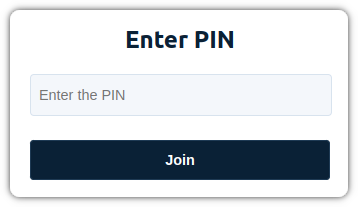
Now we will make use of a component that we have created previously. This component will display a panel in which the user can enter their PIN:
let component;
switch (connectionState) {
  case ConnectionState.PinRequired:
    component = <Pin onSubmit={ handleSetPin } required={true}/>;
    break;
  case ConnectionState.PinOptional:
    component = <Pin onSubmit={ handleSetPin } required={false}/>;
    break;
  ...
}
You will have noticed that we pass an additional property to the component
called required. This property indicates if the PIN can be left blank.
Run the app
Before testing this feature, you should use the Pexip Management Node to create a new VMR (Virtual Meeting Room) and set a PIN. Once you try to enter into that conference, you will see a new panel asking for it, and if you enter the right PIN, you will go inside the conference.
You can compare your code with the solution in Step.02-Solution-Use-a-pin. You can also check the differences with the previous lesson in the git diff.